Import Rows from csv, xls and xlsx
It is possible to start importing data from a csv, xls and xlsx file also from javascript server actions.
Syntax:
utils.importRowsFromFile(
      Long dirId,
      String fileName,
      Long importId,
      boolean insert,
      Long maxErrors,
      Long maxRowErrors,
      Map inputData,
      Long destErrorsFileDirId,
      String destErrorsFileName,
      boolean rollbackIfErrors,
      boolean async
);
| Argument | Description |
|---|---|
| dirId | id of the directory where to search the file |
| fileName | file name |
| importId | id of import (*) |
| insert | true if you want insert the rows; false if you want insert or update the rows |
| maxErrors | (optional) number of errors to block the reading of file. null: the file is read to the end 1: reading of the file stops at the first error n: reading the file stops at error number n |
| maxRowErrors | (optional) number of errors to block the process of row null: the line is read completely even in case of errors 1: processing of the line stops at the first error n: processing of the line stops at error number n when you reach the maximum number of errors for line, the line is discarded and you go to the next one |
| inputData | (optional) map of variables or data to use to insert/update the rows |
| destErrorsFileDirId | (optional) id of the directory where saving the errors file |
| destErrorsFileName | (optional) name of errors file |
| rollbackIfErrors | true: if there are errors it cancels everything; false: confirms only the successfully imported rows |
| async | true: the process send an alert to user when is finished |
(*) You can configure the import here
Example:
utils.importRowsFromFile(
      9,
      "example.xlsx",
      9,
      true,
      10,
      2,
      \{ "FIELD1": 123, "USERNAME": "TEST_USER" \},
      9,
      "errors_of_example.xlsx",
      true,
      true
);
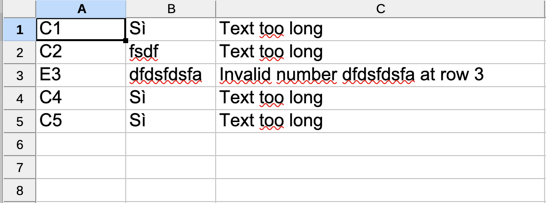
This is an example of errors file
Column A: coordinate of error cell
Column B: value in cell
Column C: type of error